

Metadata provides information about a web page for search engines, browsers, and social platforms.
In Next.js, you can define metadata using the Metadata API in layout.tsx or page.tsx. For dynamic pages, you can use generateMetadata().
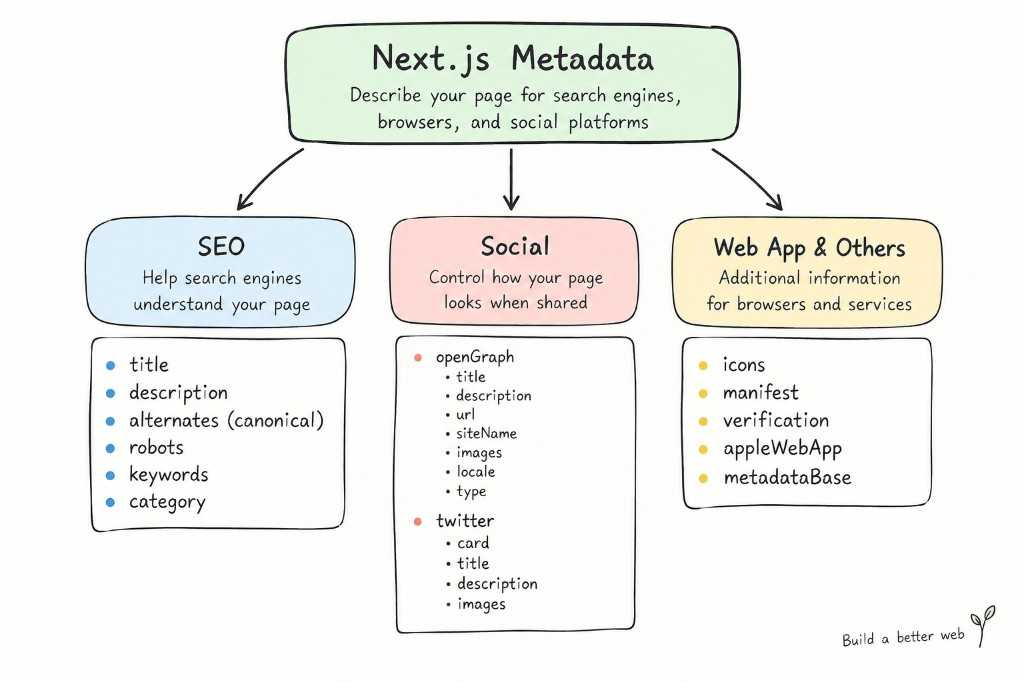
Here is a practical example containing many commonly used fields:
import type { Metadata } from "next";export const metadata: Metadata = {metadataBase: new URL("https://greengarden.com"),title: {default: "Green Garden",template: "%s | Green Garden",},description:"Discover beautiful plants, gardening tips, and tropical plant guides.",keywords: ["plants","indoor plants","Monstera","gardening",],alternates: {canonical: "/",languages: {en: "/en",vi: "/vi",},},robots: {index: true,follow: true,},openGraph: {title: "Green Garden",description:"Discover beautiful plants and gardening guides.",url: "/",siteName: "Green Garden",images: [{url: "/images/og-image.jpg",width: 1200,height: 630,alt: "Green Garden",},],locale: "en_US",type: "website",},twitter: {card: "summary_large_image",title: "Green Garden",description:"Discover beautiful plants and gardening guides.",images: ["/images/og-image.jpg"],},icons: {icon: "/favicon.ico",apple: "/apple-icon.png",},manifest: "/manifest.webmanifest",verification: {google: "your-google-verification-code",},appleWebApp: {capable: true,title: "Green Garden",statusBarStyle: "default",},category: "gardening",};
This example is intentionally broad. In a real project, you only need the fields that are relevant to your website.
Common Metadata Fields
metadataBase
Defines the base URL used to resolve relative URLs.
metadataBase: new URL("https://greengarden.com"),
For example:
/images/og-image.jpg
can be resolved against:
https://greengarden.com/images/og-image.jpg
title
Defines the page title.
title: "Plants",
It can also use default and template:
title: {default: "Green Garden",template: "%s | Green Garden",},
default is used when a child page does not define its own title. template provides a common format for child pages.
description
Provides a short description of the page.
description:"Discover beautiful plants and gardening guides.",
It helps describe the content of the page to search engines and other consumers of metadata.
keywords
Defines a list of keywords associated with the page.
keywords: ["plants","Monstera","gardening",],
It is optional and generally not something you need to prioritize.
alternates
Defines alternative URLs related to the page.
alternates: {canonical: "/plants",languages: {en: "/en/plants",vi: "/vi/plants",},},
Common uses:
canonical → main URLlanguages → localized URLs
Next.js also supports media and types under alternates.
robots
Controls instructions for search engine crawlers.
robots: {index: true,follow: true,},
For example, a private page could use:
robots: {index: false,follow: false,},
openGraph
Defines information used when the page is shared on social platforms.
openGraph: {title: "Green Garden",description: "Discover beautiful plants.",url: "/",siteName: "Green Garden",images: ["/images/og-image.jpg"],type: "website",},
Common fields include:
titledescriptionurlsiteNameimageslocaletype
twitter
Defines metadata for Twitter/X link previews.
twitter: {card: "summary_large_image",title: "Green Garden",description: "Discover beautiful plants.",images: ["/images/og-image.jpg"],},
Common fields include:
cardtitledescriptionimages
icons
Defines website icons, such as favicon and Apple icons.
icons: {icon: "/favicon.ico",apple: "/apple-icon.png",},
manifest
Defines the URL of the Web App Manifest.
manifest: "/manifest.webmanifest",
The manifest contains information about the web application, such as its name, icons, and how it should be launched.
verification
Provides verification information for external services.
verification: {google: "your-google-verification-code",},
This can be used for services such as website ownership verification.
appleWebApp
Configures how the website behaves as an Apple Web App.
appleWebApp: {capable: true,title: "Green Garden",statusBarStyle: "default",},
This is mainly relevant when supporting a web-app-like experience on Apple devices.
category
Defines the category of the document/site.
category: "gardening",
For a plant shop, a value such as gardening can describe the site’s general category.