

Table Of Contents
Supporting multiple languages in Next.js can become complicated when you manage routing, translations, and navigation yourself.
next-intl helps simplify this process.
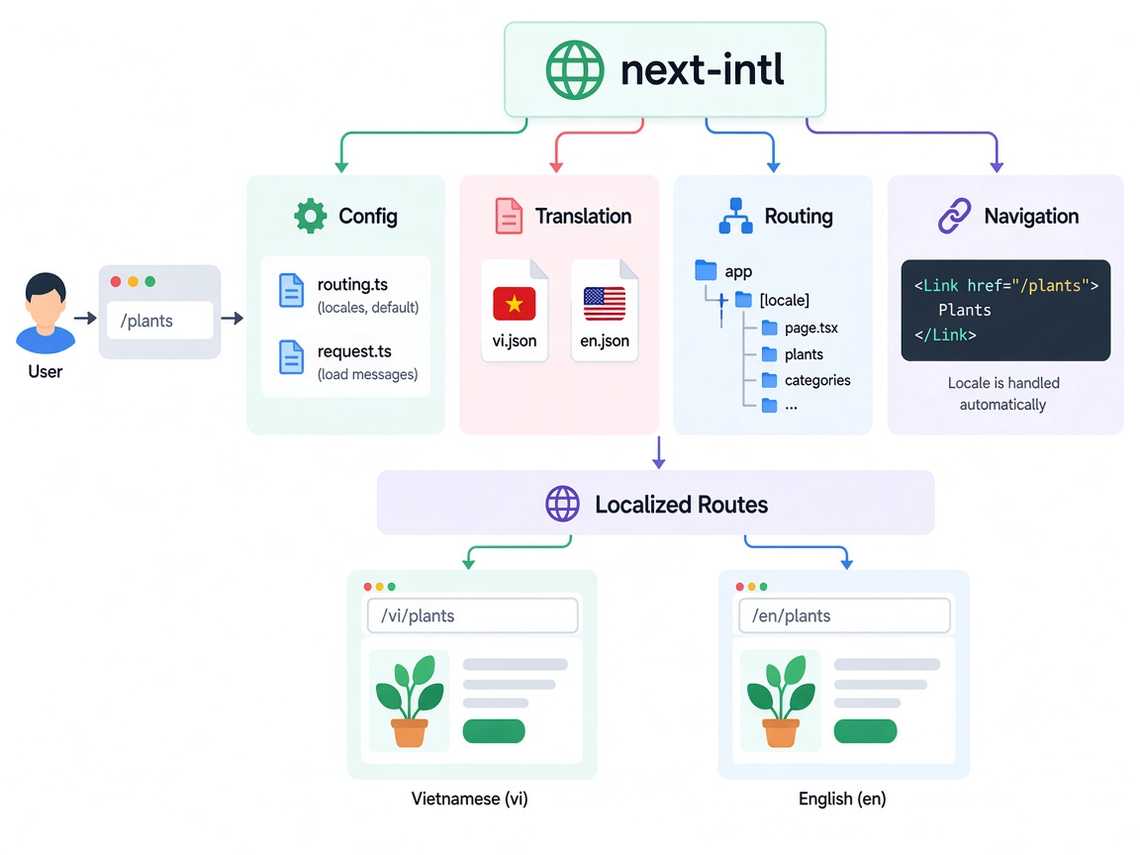
1. Install
npm install next-intl
2. Create Translation Files
Create one JSON file for each language:
messages/├── en.json└── vi.json
en.json
{"Home": {"title": "Welcome to Green Garden"}}
vi.json
{"Home": {"title": "Chào mừng đến Green Garden"}}
3. Config
Define the supported locales and the default locale.
// src/i18n/routing.tsexport const routing = defineRouting({locales: ["en", "vi"],defaultLocale: "vi",});
Now next-intl knows:
Locales: en, viDefault: vi
4. Request Config
Load the correct translation file based on the current locale.
// src/i18n/request.tsexport default getRequestConfig(async ({ requestLocale }) => {const locale = await requestLocale;return {locale,messages: (await import(`../../messages/${locale}.json`)).default,};});
For example:
/vi↓locale = vi↓messages/vi.json
5. Use Translations
In a component:
import { useTranslations } from "next-intl";export default function HomePage() {const t = useTranslations("Home");return <h1>{t("title")}</h1>;}
With vi:
Chào mừng đến Green Garden
With en:
Welcome to Green Garden
6. Locale Routing
Use [locale] in the App Router:
app/└── [locale]/├── page.tsx├── plants/│ └── page.tsx└── categories/└── page.tsx
This gives you:
/vi/plants/en/plants/vi/categories/en/categories
7. Navigation
next-intl can provide locale-aware navigation.
import { Link } from "@/i18n/navigation";<Link href="/plants">Plants</Link>
The locale is handled automatically:
/vi/plants/en/plants
You don’t need to manually write:
`/${locale}/plants`