


Table Of Contents
Next.js App Router uses your folder structure to create routes. No separate router config needed.
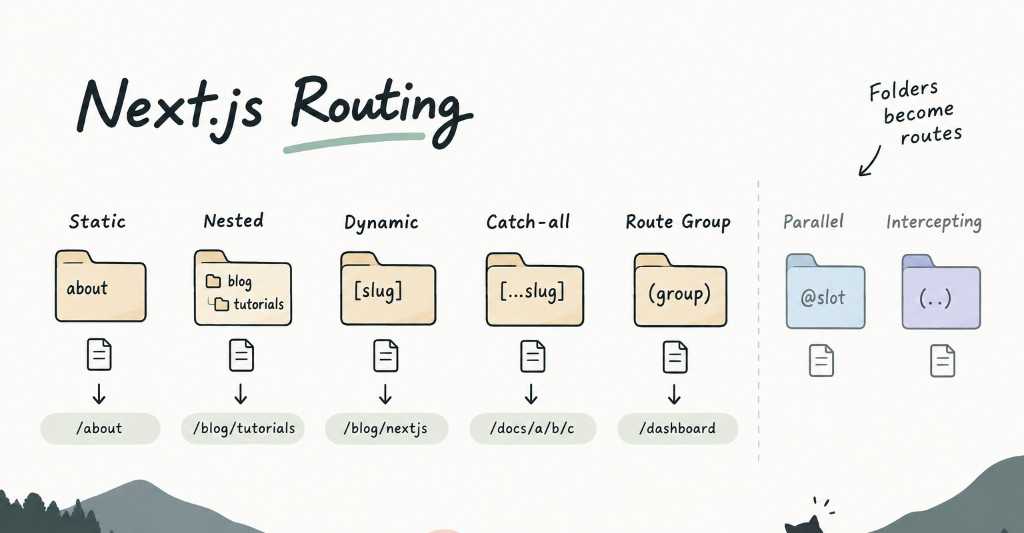
1. Static Routes
The simplest one.
app/├── page.tsx├── about/│ └── page.tsx└── contact/└── page.tsx
This gives you:
//about/contact
2. Nested Routes
Folders can be nested to create deeper URLs.
app/└── blog/└── tutorials/└── page.tsx
→ /blog/tutorials
3. Dynamic Routes [slug]
This is probably the one you’ll use the most.
app/└── blog/└── [slug]/└── page.tsx
slug is the dynamic part of the URL. You can read it from params:
export default async function Page({params,}: {params: Promise<{ slug: string }>}) {const { slug } = await paramsreturn <h1>{slug}</h1>}
For /blog/nextjs, slug is "nextjs".
4. Catch-all Routes [...slug]
Sometimes you need to match multiple URL segments.
app/└── docs/└── [...slug]/└── page.tsx
Think of it as:
[slug] → one segment[...slug] → one or more segments
Useful for documentation, CMS pages, or deep category structures.
5. Route Groups (group)
Route Groups are mainly for organizing your app.
app/├── (marketing)/│ ├── about/│ └── pricing/└── (dashboard)/└── dashboard/
The (marketing) and (dashboard) parts don’t appear in the URL.
They’re useful when you want different layouts or want to keep a large project organized.
And There Are More…
Next.js also has some more advanced routing patterns:
| Pattern | Syntax | Use case |
|---|---|---|
| Parallel Routes | @slot | Render multiple UI sections in parallel |
| Intercepting Routes | (.), (..) | Intercept a route, commonly for modals |
You probably don’t need these on day one.
Tags
Share
