


Zustand is a lightweight state management library for React. It lets components share state without passing props through multiple layers or wrapping the application in a Provider.
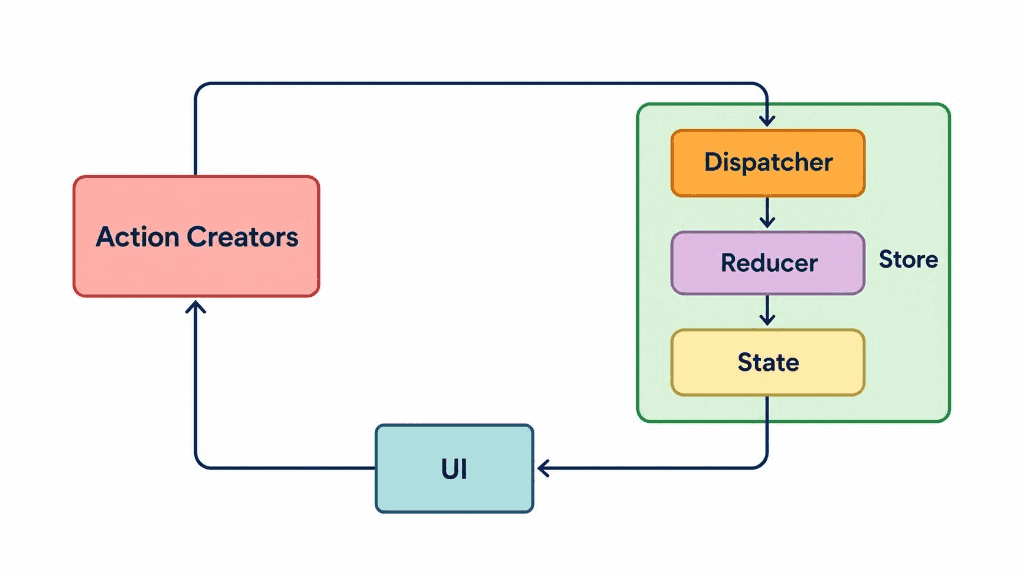
Key features include:
- Simple API: Create a store with minimal boilerplate.
- Selectors: Subscribe to specific state values.
- TypeScript support: Define state and actions with types.
- Middleware: Add persistence, DevTools, or other capabilities.
- Outside React: Access state through methods such as
getState().
Install Zustand:
npm install zustand
1. Create the store
Create store/cart.store.ts:
import { create } from "zustand";import { persist } from "zustand/middleware";type CartItem = {id: string;name: string;price: number;quantity: number;};type CartStore = {items: CartItem[];addItem: (item: CartItem) => void;removeItem: (id: string) => void;clearCart: () => void;};export const useCartStore = create<CartStore>()(persist((set) => ({items: [],addItem: (item) =>set((state) => {const existing = state.items.find((i) => i.id === item.id);return {items: existing? state.items.map((i) =>i.id === item.id? { ...i, quantity: i.quantity + item.quantity }: i): [...state.items, item],};}),removeItem: (id) =>set((state) => ({items: state.items.filter((i) => i.id !== id),})),clearCart: () => set({ items: [] }),}),{name: "green-garden-cart",partialize: (state) => ({items: state.items,}),}));
The store combines state and actions in one place.
create()creates the store hook.set()updates state, merging the returned properties with the existing state.persist()saves selected state tolocalStorage.partialize()determines which fields are persisted.
In this example, adding an existing item increases its quantity instead of creating a duplicate cart entry.
2. Use the store in a component
Create components/cart-button.tsx:
"use client";import { useCartStore } from "@/store/cart.store";export function CartButton() {const items = useCartStore((state) => state.items);const totalItems = items.reduce((total, item) => total + item.quantity,0);return <button>Cart ({totalItems})</button>;}
The "use client" directive is required because this component uses a client-side state hook and renders an interactive UI.
Why use selectors?
// Subscribe to the entire storeconst cart = useCartStore();// Subscribe only to itemsconst items = useCartStore((state) => state.items);
Selectors let components subscribe to the specific state they need, reducing unnecessary re-renders when unrelated state changes.
3. Update the cart
Any client component can use the same store:
"use client";import { useCartStore } from "@/store/cart.store";export function AddToCartButton() {const addItem = useCartStore((state) => state.addItem);return (<buttononClick={() =>addItem({id: "plant-001",name: "Monstera",price: 150000,quantity: 1,})}>Add to cart</button>);}
When the customer adds a plant, the shared cart state updates and the header count changes automatically. The cart also survives page refreshes because of persist().
