


Table Of Contents
1. What Is Rate Limiting?
Rate limiting controls how many requests a client can make within a specific period of time.
For example, an IP address may be allowed to attempt login only five times per minute.
Without rate limiting, an API can be abused to:
- Guess passwords through brute-force attacks.
- Spam order forms and reviews.
- Increase AI API costs through excessive requests.
- Consume server resources and slow down other users.
When a client exceeds the configured limit, the API returns HTTP 429 Too Many Requests. A Retry-After header can tell the client how many seconds to wait before retrying.
2. What Is SlowAPI?
SlowAPI is a rate-limiting library for FastAPI and Starlette, adapted from Flask-Limiter.
It uses the limits library to manage counters and enforce request limits.
Instead of implementing the entire counting mechanism yourself, you can apply limits directly to FastAPI endpoints using decorators.
3. How Does Rate Limiting Work?
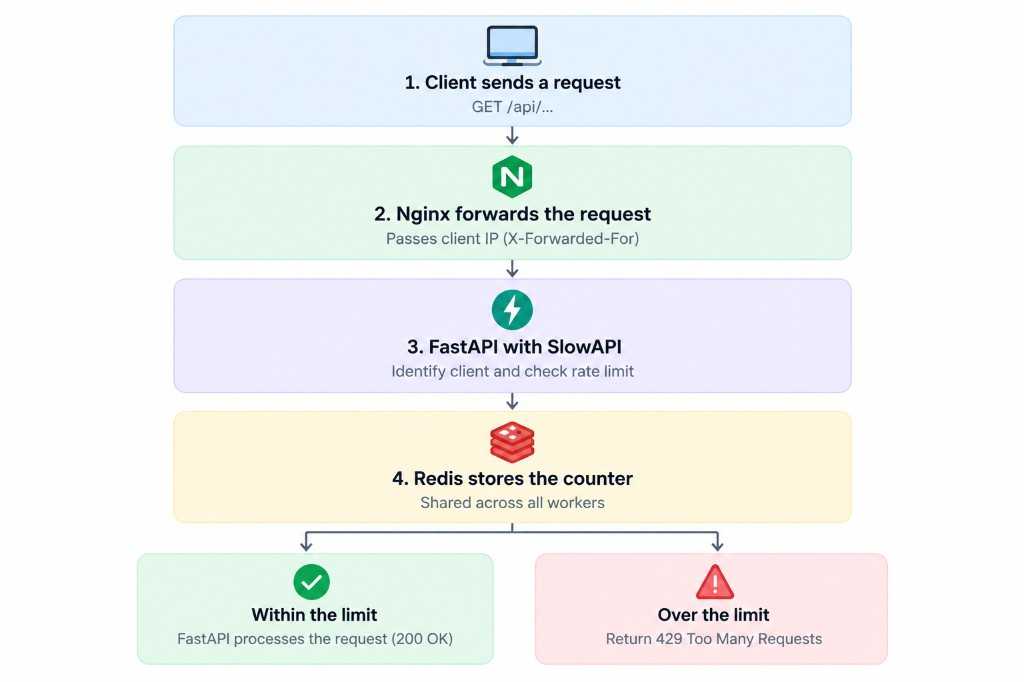
For every request, the rate limiter performs three steps:
- Identify the client: Usually by IP address or user ID.
- Count the request: Update the corresponding counter.
- Check the limit: Allow the request to continue or return HTTP 429.
For example, with a limit of 5/minute, the sixth request within the same limiting window will be rejected.
Counters are stored in a storage backend:
memory://stores counters inside the Python process.redis://stores counters in Redis, allowing multiple workers or servers to share them.
4. Install SlowAPI
Install the required libraries:
pip install slowapi redis
SlowAPI uses the limits library internally to manage rate limits.
1. Initialize the Rate Limiter
Create a shared limiter for your FastAPI application:
from fastapi import FastAPIfrom slowapi import Limiter, _rate_limit_exceeded_handlerfrom slowapi.errors import RateLimitExceededfrom slowapi.util import get_remote_addressapp = FastAPI()limiter = Limiter(key_func=get_remote_address,storage_uri="memory://",headers_enabled=True,)app.state.limiter = limiterapp.add_exception_handler(RateLimitExceeded,_rate_limit_exceeded_handler,)
Here’s what each option does:
key_func: Identifies the client. This example uses the client’s IP address.storage_uri: Specifies where request counters are stored.headers_enabled=True: Enables rate-limit response headers.app.state.limiter: Registers the limiter with the FastAPI application.add_exception_handler: Handles requests that exceed their limits.
In this example, memory:// is a simple choice for local development and experimentation.
2. Limit an Individual Endpoint
Use the @limiter.limit() decorator to restrict requests to a specific endpoint:
from fastapi import Request, Response@app.post("/login")@limiter.limit("5/minute")async def login(request: Request,response: Response,):return {"message": "Login endpoint"}
This endpoint allows five requests per minute per client IP.
SlowAPI requires the request: Request parameter to identify the client. If your endpoint returns a dictionary or Pydantic model rather than an existing Response object, add response: Response so the library can attach rate-limit headers.
Common limit formats include:
| Configuration | Meaning |
|---|---|
5/minute | 5 requests per minute |
100/hour | 100 requests per hour |
10/minute;200/day | Both limits apply simultaneously |
3. Set a Global Rate Limit
Besides individual endpoint limits, you can configure a default limit for the application.
For example, allow each IP address up to 200 requests per minute:
from slowapi.middleware import SlowAPIASGIMiddlewarelimiter = Limiter(key_func=get_remote_address,application_limits=["200/minute"],)app.state.limiter = limiterapp.add_middleware(SlowAPIASGIMiddleware)
You can exclude endpoints such as health checks:
@app.get("/health")@limiter.exemptasync def health():return {"status": "ok"}
In production, verify the middleware and exception-handler configuration against the SlowAPI version you use.
4. Why Does Production Often Need Redis?
With memory://, each worker maintains its own counters.
Suppose your application runs four workers, each enforcing a limit of five requests per minute. A client may exceed the intended limit because each worker only knows about its own requests.
Redis solves this by storing counters in a shared backend:
limiter = Limiter(key_func=get_remote_address,storage_uri="redis://redis:6379/0",headers_enabled=True,)
With Docker Compose, Redis can run as a separate service:
services:redis:image: redis:7-alpinecommand:- redis-server- --save- ""- --appendonly- "no"
This configuration disables RDB snapshots and AOF persistence because rate-limit counters can be recreated.
Redis is particularly useful when running multiple workers or servers. If your application runs a single worker on a small VPS, memory:// may be simpler, provided you accept that counters reset when the process restarts.
