


React follows a clear loop from state change to UI update. Understanding trigger, render, commit, and Effects helps you reason about when components mount, update, and clean up.
Here are 4 lifecycle concepts every React developer should understand.
1. How React Updates the UI
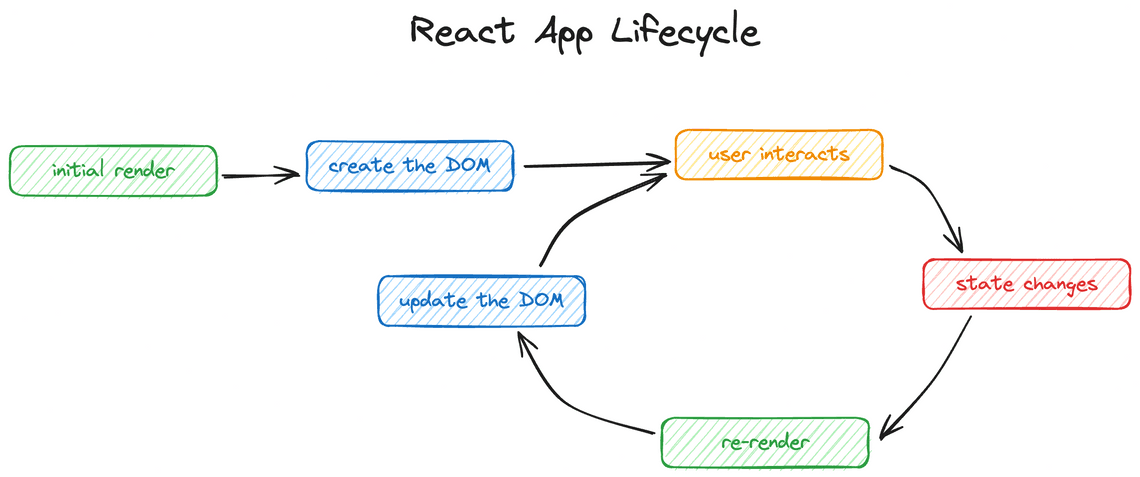
React follows three main steps: Trigger → Render → Commit.
- Trigger: An initial render or a state update schedules rendering.
- Render: React calls components to calculate the next UI.
- Commit: React applies the necessary changes to the DOM.
After the commit, Effects run according to their scheduling rules.
import { useState } from "react";function Counter() {const [count, setCount] = useState(0);return (<button onClick={() => setCount(count + 1)}>Count: {count}</button>);}
When the button is clicked, React schedules an update, renders the component with the new state, and commits the DOM changes.
Key point: Rendering does not necessarily mean the entire DOM is recreated. React updates only the necessary DOM changes.
2. Mount, Update, and Unmount
In function components, mount, update, and unmount describe the component’s lifecycle.
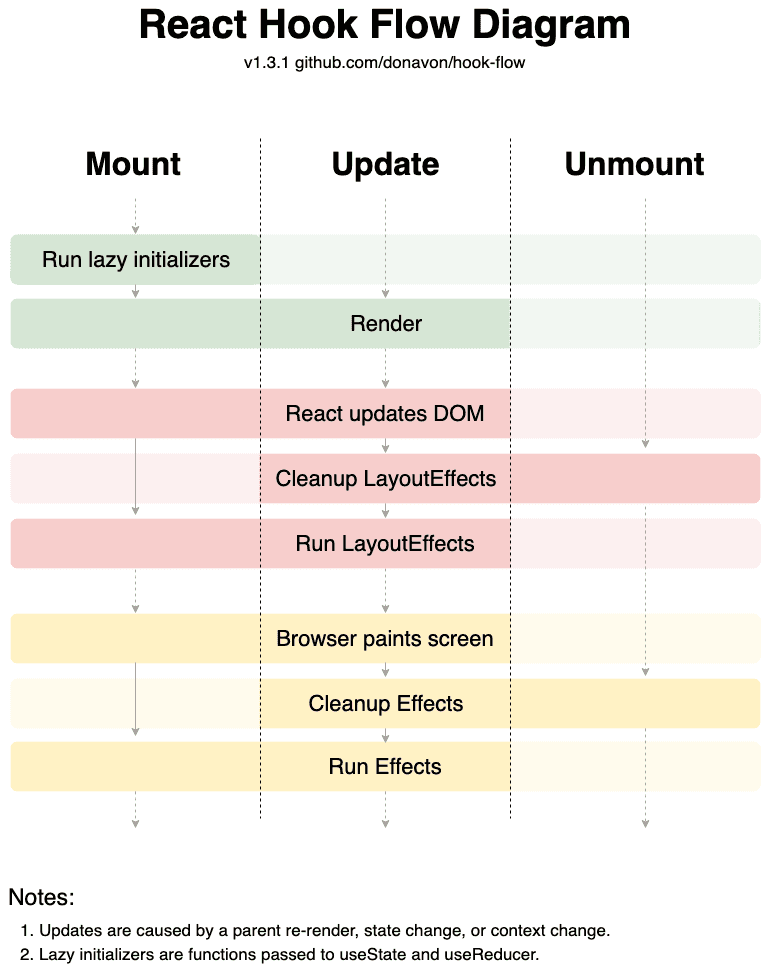
Mount
The component is added to the UI for the first time.
useEffect(() => {console.log("Component mounted");return () => {console.log("Component cleanup");};}, []);
Update
The component renders again because its state, props, or consumed context changes, or because its parent renders again.
useEffect(() => {console.log("Count changed:", count);}, [count]);
Unmount
The component is removed from the UI. React runs the cleanup functions of its Effects.
useEffect(() => {const handleResize = () => {console.log(window.innerWidth);};window.addEventListener("resize", handleResize);return () => {window.removeEventListener("resize", handleResize);};}, []);
Why is cleanup important?
It prevents stale subscriptions, unnecessary event listeners, and other resources from remaining active after they are no longer needed.
3. useEffect vs useLayoutEffect
Both Hooks synchronize React components with external systems, but they differ in timing.
| Hook | Purpose |
|---|---|
useEffect | Synchronize with external systems, usually without blocking paint |
useLayoutEffect | Read layout or apply visual changes before the browser repaints |
Example: measuring an element before displaying a tooltip.
import { useLayoutEffect, useRef, useState } from "react";function Tooltip() {const ref = useRef(null);const [height, setHeight] = useState(0);useLayoutEffect(() => {setHeight(ref.current.getBoundingClientRect().height);}, []);return (<div ref={ref}>Tooltip height: {height}px</div>);}
Use useEffect by default. Use useLayoutEffect when you need to measure layout or perform a visual update before repainting to avoid flicker.
Share
