


Micro Frontends split a large frontend into independently developed and deployed applications. Combined with Vite and Module Federation, this architecture enables team autonomy and independent releases, but also introduces integration complexity.
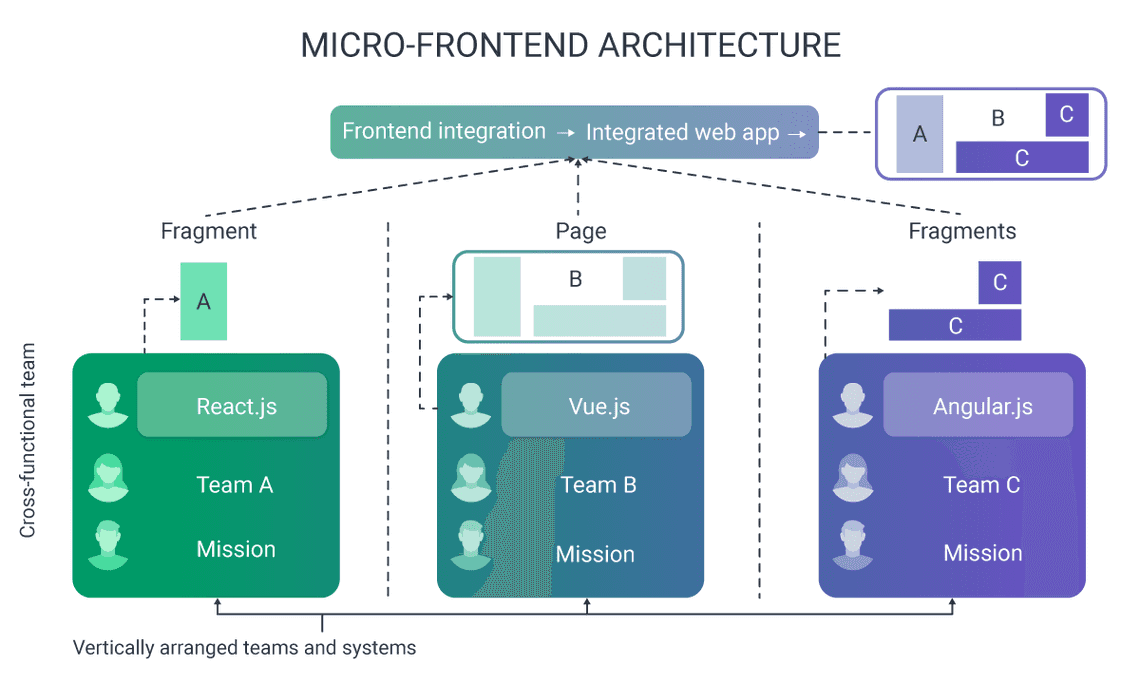
1. What Is a Micro Frontend?
A Micro Frontend is an architectural pattern where different UI domains are developed, tested, and deployed independently, then composed into a larger application.
Benefits include:
- Independent development and deployment
- Clearer ownership between teams
- Reduced coupling between business domains
- Flexibility to evolve individual applications
2. How Module Federation Works
Module Federation allows one application to load exposed modules from another application at runtime.
- Host: The main application that loads remote modules.
- Remote: An application that exposes components or functionality.
remoteEntry.js: The remote’s entry file, used by the federation runtime to discover exposed modules.- Shared dependencies: Libraries such as React that can be shared between applications.
With Vite, one option is @originjs/vite-plugin-federation.
3. Create the Applications
npm create vite@latest host-app -- --template reactnpm create vite@latest todo-components -- --template react
Install dependencies in both applications:
cd host-appnpm installcd ../todo-componentsnpm install
Install the federation plugin in each project:
npm install @originjs/vite-plugin-federation
4. Configure the Remote
In todo-components/vite.config.js:
import { defineConfig } from "vite";import react from "@vitejs/plugin-react";import federation from "@originjs/vite-plugin-federation";export default defineConfig({plugins: [react(),federation({name: "todo_components",filename: "remoteEntry.js",exposes: {"./Input": "./src/components/Input.jsx","./List": "./src/components/List.jsx",},shared: ["react", "react-dom"],}),],build: {target: "esnext",},});
The remote exposes Input and List, making them available to the host through Module Federation.
5. Configure the Host
In host-app/vite.config.js:
import { defineConfig } from "vite";import react from "@vitejs/plugin-react";import federation from "@originjs/vite-plugin-federation";export default defineConfig({plugins: [react(),federation({name: "host_app",remotes: {todo_components: {external:"http://localhost:4173/assets/remoteEntry.js",format: "esm",from: "vite",},},shared: ["react", "react-dom"],}),],build: {target: "esnext",},});
The host now knows where to find the remote application’s federation entry file.
6. Import Remote Components
Use the exposed modules in the host just like regular imports:
import { Suspense, lazy } from "react";const Input = lazy(() => import("todo_components/Input"));const List = lazy(() => import("todo_components/List"));export default function App() {return (<Suspense fallback={<p>Loading components...</p>}><Input /><List /></Suspense>);}
For TypeScript, add module declarations for the remote imports so the compiler can resolve their types.
7. Build and Run
Build the remote first:
cd todo-componentsnpm run buildnpm run preview -- --host 0.0.0.0
Then start the host in another terminal:
cd host-appnpm run dev
The host loads the remote from the preview server. Ensure the remote URL, exposed modules, and shared dependency configuration match your setup.
Key Considerations
- Version compatibility: Keep React versions compatible between host and remote.
- Loading failures: Provide fallback UI when a remote is unavailable.
- Deployment: Publish the remote entry file and its assets to a stable URL.
- Testing: Test remote components independently and verify host integration.
- Trade-offs: Module Federation adds runtime dependencies, deployment coordination, and debugging complexity.
Final Thoughts
Vite and Module Federation can make Micro Frontends practical when multiple teams need to develop and deploy parts of a large frontend independently.
However, Micro Frontends are not automatically better than a modular monolith. For a small application or a single team, a feature-based React architecture is often simpler.
Use Micro Frontends when independent team ownership and deployment justify the additional complexity.
Tags
Share
