


Table Of Contents
When building an AI chatbot, there is one important limitation: an LLM can generate text, but it cannot directly execute your application code.
For example, if the user asks:
“What’s the weather like in Hanoi today?”
The LLM itself cannot call your weather API. This is where Function Calling comes in.
Function Calling allows us to give the LLM a list of available functions. The LLM analyzes the user’s request, chooses the appropriate function, and returns the function name + arguments. Our application then executes that function and sends the result back to the LLM.
How does the flow work?
The overall flow is:
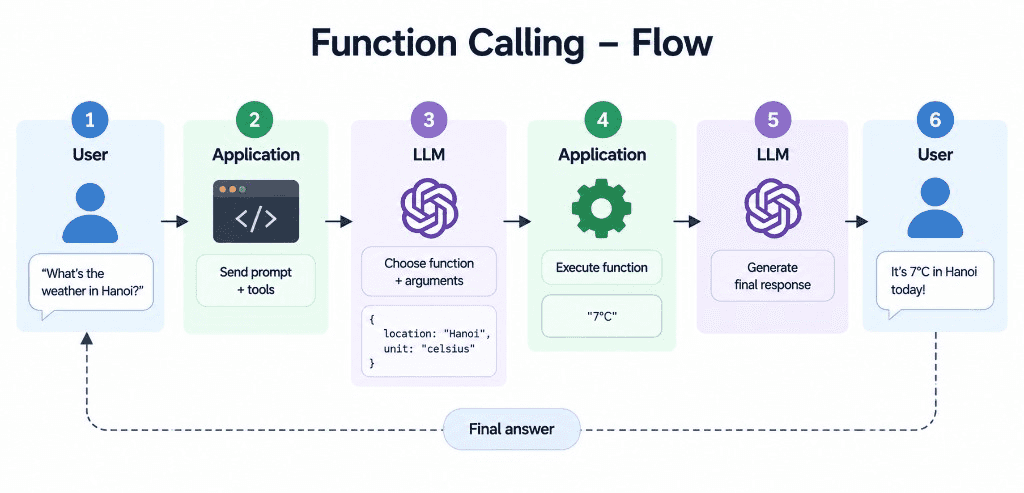
The important thing to understand is:
The LLM does not execute the function. It only decides which function should be called and what arguments should be passed.
Your application is responsible for actually executing the function.
1. Define your functions
For example:
def get_current_weather(location: str, unit: str):"""Get the current weather in a given location"""return "It's very cold, 7°C"def get_stock_price(symbol: str):passdef view_website(url: str):pass
We then describe these functions to the LLM through tools.
tools = [{"type": "function","function": {"name": "get_current_weather","description": "Get the current weather in a given location","parameters": {"type": "object","properties": {"location": {"type": "string","description": "The city name"},"unit": {"type": "string","enum": ["celsius", "fahrenheit"],"description": "The temperature unit"}},"required": ["location", "unit"]}}}]
The LLM uses the name, description, and parameters to understand when and how a function should be used. Using enum is also useful when a parameter only accepts a fixed set of values.
2. Send the request to the LLM
response = client.chat.completions.create(model="gpt-5.4-mini",messages=[{"role": "user","content": "What's the weather in Hanoi today?"}],tools=tools)
The LLM analyzes the request and may return:
tool_call = response.choices[0].message.tool_calls[0]print(tool_call.function.name)# get_current_weatherprint(tool_call.function.arguments)# {"location":"Hanoi","unit":"celsius"}
The model has essentially said:
Call: get_current_weatherArguments:{"location": "Hanoi","unit": "celsius"}
This is the core idea of Function Calling: the model requests a tool call instead of directly answering the user.
3. Execute the function
Now your application takes those arguments and runs the actual function:
import jsonarguments = json.loads(tool_call.function.arguments)weather_result = get_current_weather(arguments["location"],arguments["unit"])print(weather_result)# It's very cold, 7°C
In a real application, this function could call a weather API, query a database, call another service, or execute some business logic.
So remember:
LLM decides what to call. Your application executes it.
4. Send the result back to the LLM
We then send the tool result back:
messages.append(response.choices[0].message)messages.append({"role": "tool","tool_call_id": tool_call.id,"content": weather_result})
The LLM now has the complete context:
User:What's the weather in Hanoi today?Assistant:Call get_current_weather(location="Hanoi",unit="celsius")Tool:"It's very cold, 7°C"
We call the LLM again:
final_response = client.chat.completions.create(model="gpt-5.4-mini",messages=messages)print(final_response.choices[0].message.content)
The LLM can now turn the raw tool result into a natural response:
“It’s 7°C in Hanoi today, so you might want to wear something warm.”
