


Table Of Contents
Redux Toolkit usually answers one question: “What is the current state of the application?”
Redux Saga answers a different question: “What should happen next when an action occurs?”
This post builds on Redux Toolkit. Instead of learning Redux Saga effects one by one, we can understand them through a realistic example: a Concurrent Test Runner.
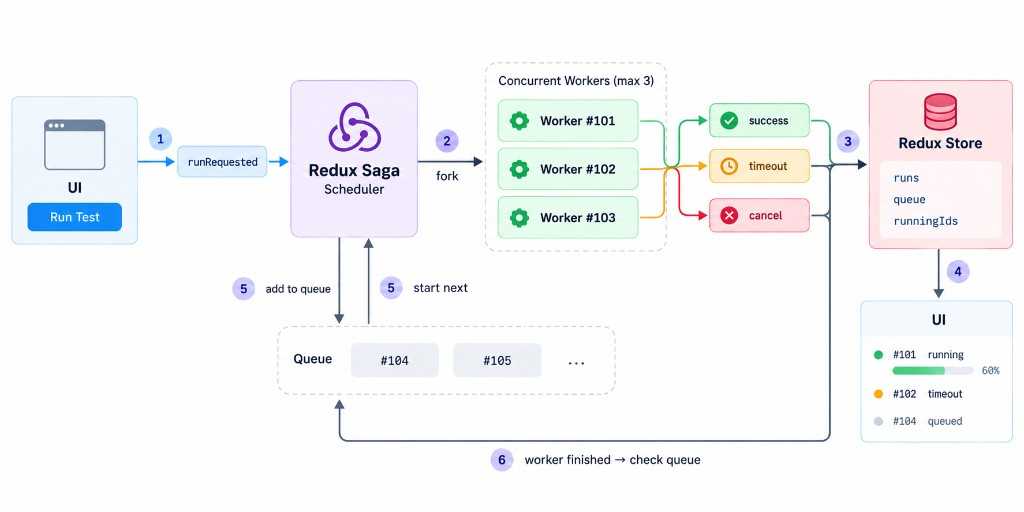
The Problem
Imagine an application that runs automated tests. Multiple users can submit test runs:
However, the system only allows three tests to run at the same time, so maxConcurrency = 3.
Running:#101#102#103Queue:#104#105
When #101 finishes, the scheduler starts #104:
If the user cancels #103, another queued task can take its place. If #102 runs longer than the configured timeout, the worker is stopped and its status becomes timeout. The user can then retry the failed run.
Reading and Updating Redux
select → Saga reads Reduxput → Saga dispatches to Redux
These two effects form the basic communication layer between Saga and Redux.
select allows a Saga to read the current Redux state. For example, the scheduler might use select(selectRunningIds), select(selectMaxConcurrency), and select(selectQueue).
put dispatches a Redux action from Saga. For example, a worker can call yield put(runStarted(runId)) when it starts, yield put(progressUpdated(...)) while running, and yield put(runCompleted(...)) when it finishes.
Running and Managing Tasks
With call, the Saga blocks until the operation finishes:
yield call(executeTests, runId);
With fork, the Saga starts a background task and continues immediately:
const task = yield fork(runTest, runId);
This allows multiple workers to run concurrently:
Scheduler│├── fork(#101) ──→ Worker #101├── fork(#102) ──→ Worker #102└── fork(#103) ──→ Worker #103
What is a Task?
When we write const task = yield fork(runTest, runId), the returned task represents the running Saga.
We can later use it with cancel(task) or join(task).
join
join allows one Saga to wait for another Saga Task to finish. This is useful for a multi-user simulation where we start several background workers and then want to wait until all of them are complete.
const tasks = [];for (const user of users) {tasks.push(yield fork(runUser, user));}for (const task of tasks) {yield join(task);}
Cancellation and Cleanup
When the user clicks Cancel, the scheduler can call yield cancel(task). This is different from simply dispatching runCancelled(runId). The Redux action changes application state, while cancel(task) actually sends a cancellation signal to the running Saga Task.
The finally block is useful because cleanup may be required when the task completes normally, throws an error, or gets cancelled.
Inside finally, yield cancelled() tells us whether the current Saga was cancelled:
function* runTest(runId: string) {try {yield call(executeTests, runId);} finally {if (yield cancelled()) {yield put(runCancelled(runId));}}}
The important pattern is:
try↓worker runs↓cancelled?↓finally↓cancelled() === true↓cleanup
Timeout and Competing Workflows
A common requirement in the Test Runner is a timeout. For example, a test should not run longer than 30 seconds:
yield race({test: call(executeTests, runId),timeout: delay(30000),});
There are now two competing branches:
executeTests│├── finishes first → test wins│└── 30 seconds → timeout wins
This is what race is designed for: multiple effects compete, and the first one to finish wins. The losing branches are cancelled.
We can add user cancellation as a third branch:
const isCancelForRun = (runId: string) => (action) =>cancelRun.match(action) && action.payload === runId;const { test, timeout, cancel } = yield race({test: call(executeTests, runId),timeout: delay(30000),cancel: take(isCancelForRun(runId)),});
Now the worker is waiting for three possible outcomes:
┌── test completesrace ────────┼── timeout└── user cancels
Whichever happens first wins, and only the winning key is set in the result.
Watching Actions
takeEvery and takeLatest control how Saga responds to repeated actions.
With takeEvery:
yield takeEvery(runRequested.type,handleRunRequested);
This is usually appropriate for runRequested because we don’t want a new test submission to silently replace an earlier one.
takeLatest behaves differently:
yield takeLatest(searchRequested.type,searchSaga);
If the user searches repeatedly:
search("rea")search("reac")search("react")
the previous Saga can be cancelled so that only the latest request remains active.
search #1 ──Xsearch #2 ──Xsearch #3 ─────────→ execute
Tags
Share
