


Rate limiting controls how many requests a client can make within a specific period. It helps protect APIs from brute-force attacks, automated abuse, and excessive resource consumption.
For example, a login endpoint might allow five attempts per minute from a single client IP address.
1. What Is SlowAPI?
SlowAPI is a rate-limiting library for FastAPI and Starlette, adapted from Flask-Limiter. It uses the limits library to track requests and enforce configured limits.
2. How Rate Limiting Works
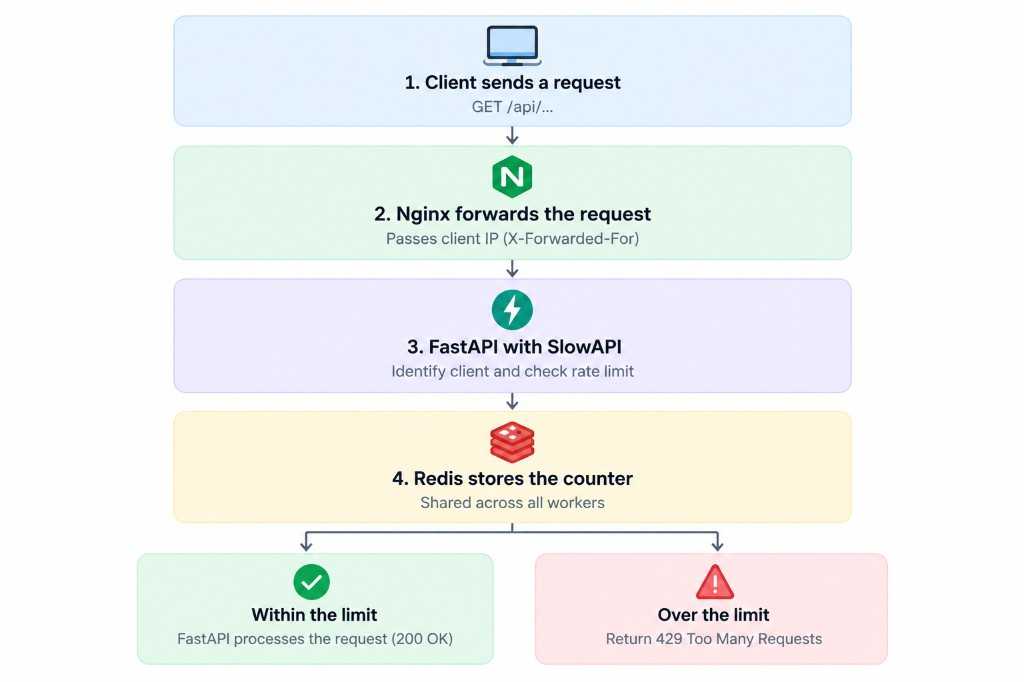
For every request, the rate limiter performs three steps:
- Identify the client: Usually by IP address or authenticated user ID.
- Count requests: Update the counter for that client.
- Enforce the limit: Allow the request or return HTTP
429 Too Many Requests.
For a limit of 5/minute, a sixth request within the applicable limiting window is rejected.
The counters can be stored in different backends:
memory://stores counters in the current Python process.redis://stores counters in Redis, allowing multiple workers and servers to share rate-limit state.
Memory storage is suitable for local experimentation. Redis is generally preferable for production deployments with multiple workers.
3. Install Dependencies
Install SlowAPI and Redis support:
pip install slowapi redis
SlowAPI uses the limits library internally to manage rate limits.
4. Initialize the Rate Limiter
Create a shared limiter and register it with FastAPI.
from fastapi import FastAPIfrom slowapi import Limiter, _rate_limit_exceeded_handlerfrom slowapi.errors import RateLimitExceededfrom slowapi.util import get_remote_addressapp = FastAPI()limiter = Limiter(key_func=get_remote_address,storage_uri="memory://",headers_enabled=True,)app.state.limiter = limiterapp.add_exception_handler(RateLimitExceeded,_rate_limit_exceeded_handler,)
Key configuration options:
key_func: Identifies the client. Here, it uses the remote IP address.storage_uri: Defines where rate-limit counters are stored.headers_enabled=True: Enables rate-limit response headers.app.state.limiter: Makes the limiter available to the application.add_exception_handler(): Returns an appropriate response when a limit is exceeded.
For production, replace memory:// with a Redis connection URL, such as redis://localhost:6379/0, and configure Redis authentication and network access appropriately.
5. Limit an Individual Endpoint
Use the @limiter.limit() decorator to protect a specific route.
from fastapi import Request, Response@app.post("/login")@limiter.limit("5/minute")async def login(request: Request,response: Response,):return {"message": "Login endpoint"}
This example allows five requests per minute per client IP.
SlowAPI requires the request: Request parameter on decorated endpoints. Including response: Response allows the library to attach rate-limit headers when the endpoint returns a dictionary or Pydantic model.
Common configurations include:
| Configuration | Meaning |
|---|---|
5/minute | 5 requests per minute |
100/hour | 100 requests per hour |
10/minute;200/day | Both limits apply |
For authentication endpoints, combine rate limiting with secure password hashing, generic login error messages, and appropriate account-abuse protections.
6. Configure a Global Rate Limit
You can also define application-wide limits that apply by default to routes handled by SlowAPI’s middleware.
from slowapi.middleware import SlowAPIASGIMiddlewarelimiter = Limiter(key_func=get_remote_address,application_limits=["200/minute"],storage_uri="redis://localhost:6379/0",headers_enabled=True,)app.state.limiter = limiterapp.add_exception_handler(RateLimitExceeded,_rate_limit_exceeded_handler,)app.add_middleware(SlowAPIASGIMiddleware)
This configuration sets a default limit of 200 requests per minute per client key. Endpoint-specific limits can impose stricter restrictions.
You can exempt endpoints such as health checks:
@app.get("/health")@limiter.exemptasync def health():return {"status": "ok"}
Ensure the limiter is configured once and shared by the application. Avoid creating separate limiter instances unnecessarily, because that can complicate configuration and enforcement.
7. Important Production Considerations
Use Redis for shared counters. In-memory limits are independent across worker processes and reset when a process restarts.
Configure trusted proxies correctly. Behind Nginx or another reverse proxy, the apparent client IP may be the proxy’s address. Trust forwarded client IP headers only from known proxies; otherwise, clients may spoof their IP to bypass limits.
Choose limits by endpoint. Login, password-reset, expensive database queries, and AI generation endpoints may need stricter limits than ordinary read-only endpoints.
Return HTTP 429 consistently. Clients should be able to recognize rate-limit responses and back off before retrying.
Monitor rate-limit activity. Track rejected requests and adjust thresholds based on normal traffic patterns.
Key Takeaways
- SlowAPI provides route-level and application-wide rate limiting for FastAPI.
key_funcdetermines which client a request belongs to.- Redis shares rate-limit counters across workers and servers.
- Trusted proxy configuration is essential when identifying clients by IP.
- Endpoint-specific limits help protect sensitive or expensive operations.
Rate limiting is an important layer of API protection, but it works best alongside authentication, authorization, input validation, and monitoring.
