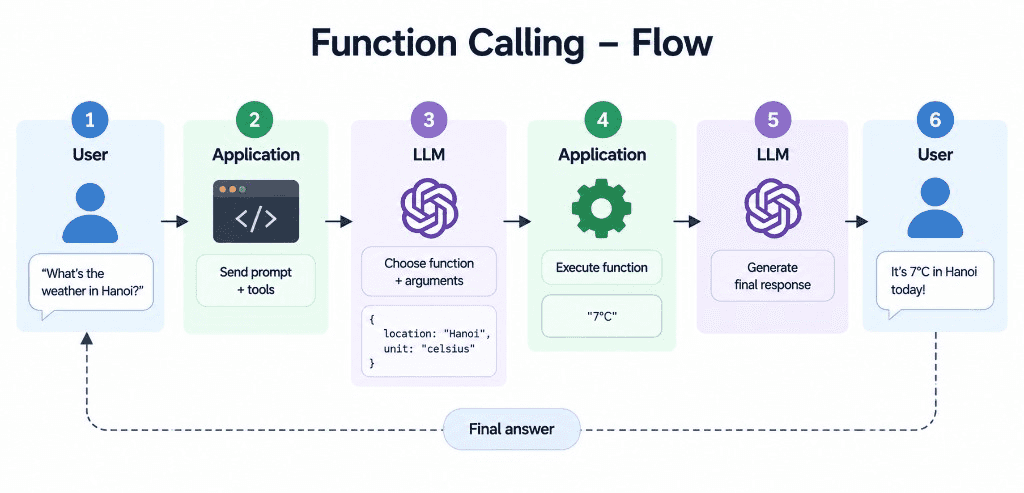
Large Language Models (LLMs) can understand natural language and generate responses, but they cannot directly interact with external systems unless they are connected to tools. Function calling enables an LLM to select appropriate functions and generate the arguments needed to execute them.
A typical function-calling workflow consists of five steps:
Define tools: Provide the LLM with function names, descriptions, and parameter schemas.
Analyze the request: The LLM determines whether a tool is needed.
Generate a tool call: The LLM returns the selected function name and arguments.
Execute the function: Your application validates the arguments and runs the corresponding function.
Generate the final response: Send the tool result back to the LLM so it can formulate a natural-language answer.
Function Calling flow — User → Application → LLM → Execute → Final answer
The important distinction is that the LLM usually does not execute your Python function itself. It generates a structured request, and your application performs the actual execution.
Tools are commonly described using a JSON Schema that specifies the function name, purpose, and parameters.
For example, a weather tool can be defined as follows:
weather_tool ={
"type":"function",
"function":{
"name":"get_current_weather",
"description":"Get the current weather in a city.",
"parameters":{
"type":"object",
"properties":{
"location":{
"type":"string",
"description":"The city name."
},
"unit":{
"type":"string",
"enum":["celsius","fahrenheit"],
"description":"The temperature unit."
}
},
"required":["location","unit"],
"additionalProperties":False
},
"strict":True
}
}
A good schema helps the model understand when to use the tool and which arguments it must provide. Enums can restrict arguments to predefined values, while required fields help enforce the expected structure.
The strict option is supported by compatible OpenAI APIs and models; exact schema requirements vary by provider.
The model might generate a tool call with these arguments:
{
"location":"Hanoi",
"unit":"celsius"
}
Your application can parse the arguments and execute the function.
import json
defget_current_weather(
location:str,
unit:str
)->str:
# Replace this example with a real weather API.
returnf"Current weather in {location}: 7°C"
arguments = json.loads(
'{"location": "Hanoi", "unit": "celsius"}'
)
result = get_current_weather(**arguments)
print(result)
Output:
Current weather in Hanoi: 7°C
This example demonstrates local function execution. The returned temperature is hardcoded, so it is not actual live weather data.
In a real application, you would send the tool definition to the LLM, inspect its response, execute the requested function, and return the result to the model.
The full workflow requires another LLM request after executing the function.
With OpenAI’s Chat Completions API, the process looks like this:
import json
from openai import OpenAI
client = OpenAI()
messages =[
{
"role":"user",
"content":"What is the weather in Hanoi?"
}
]
response = client.chat.completions.create(
model="YOUR_SUPPORTED_MODEL",
messages=messages,
tools=[weather_tool]
)
assistant_message = response.choices[0].message
if assistant_message.tool_calls:
messages.append(assistant_message)
for tool_call in assistant_message.tool_calls:
if tool_call.function.name =="get_current_weather":
arguments = json.loads(
tool_call.function.arguments
)
result = get_current_weather(**arguments)
messages.append({
"role":"tool",
"tool_call_id": tool_call.id,
"content": result
})
final_response = client.chat.completions.create(
model="YOUR_SUPPORTED_MODEL",
messages=messages
)
print(final_response.choices[0].message.content)
else:
print(assistant_message.content)
Replace YOUR_SUPPORTED_MODEL with a model available to your account that supports tool calling.
This example illustrates the basic loop. Production implementations should also validate arguments, handle exceptions, check API responses, and support multiple tool calls when returned.
This generates a JSON Schema describing the function’s input structure. However, generating the schema alone does not create a complete tool definition. You still need to provide the function name, description, and any provider-specific formatting required by the API.
For complex applications, dedicated schema-generation utilities can reduce duplicated definitions and help keep tool contracts consistent.
Function calling and the Model Context Protocol (MCP) solve related but different problems.
Function calling is a model interaction pattern in which the LLM selects a tool and generates structured arguments.
MCP is an open protocol for connecting AI applications to external tools and data sources through a standardized interface.
An MCP server can expose tools to compatible clients, while those clients can use an LLM’s tool-calling capabilities to decide when to invoke them. MCP does not replace the underlying model’s reasoning or eliminate the need for authorization and validation.
Function calling extends LLM applications beyond text generation by connecting language models to APIs, Python functions, databases, and other external systems.
The essential workflow is straightforward: define tools, let the model select a function and generate arguments, execute the function in your application, and return the result to the model.
This pattern is a fundamental building block for AI assistants and agents that need to retrieve information, perform calculations, or take actions in external systems.