Security is an essential part of building a production-ready API. A secure application must protect user accounts, validate incoming data, control access, and prevent abuse.
This guide covers essential security practices for FastAPI applications, from authentication and rate limiting to input validation and secrets management.
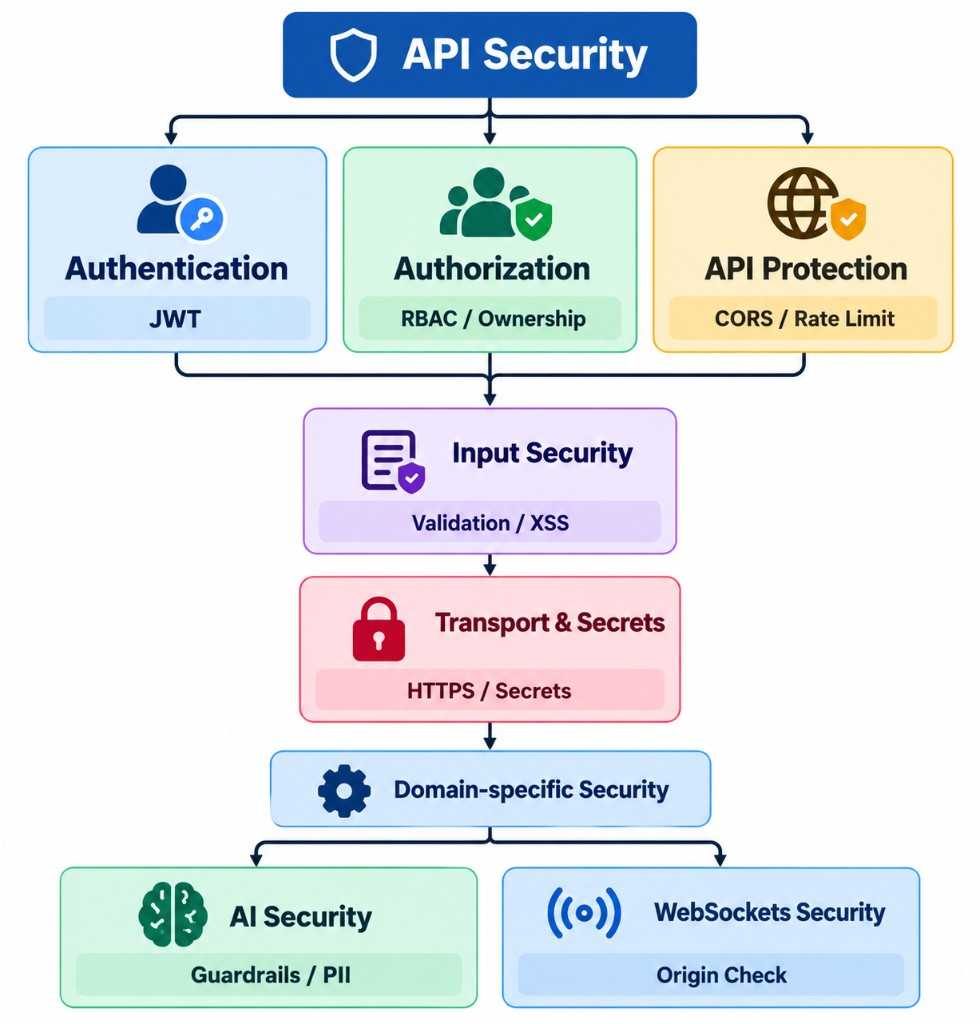
API security layers — Authentication, Authorization and API Protection, then Input Security, Transport & Secrets, and Domain-specific Security for AI and WebSockets
For example, a user logs in with an email and password. The server verifies the credentials and issues a token or establishes a session.
POST /login
↓
Validate credentials
↓
Issue token or create session
↓
Authenticate subsequent requests
FastAPI dependencies can verify credentials and retrieve the current user. If you use JWTs, validate the signature, expiration, and relevant claims.
Authorization answers: What are you allowed to do?
After identifying a user, the application must determine whether that user has permission to perform a specific action.
For example:
Admin
├── Create product
├── Update product
└── Delete product
Customer
├── View product
└── Create order
Implement permission checks in reusable dependencies or service-level authorization rules. Always verify resource ownership where applicable, such as ensuring customers can access only their own orders.
CORS controls which browser origins are allowed to make cross-origin requests to your API. It is a browser security mechanism, not an authentication or authorization system.
For example, if your frontend runs at https://myapp.com, configure FastAPI to allow that origin:
from fastapi import FastAPI
from fastapi.middleware.cors import CORSMiddleware
app = FastAPI()
app.add_middleware(
CORSMiddleware,
allow_origins=["https://myapp.com"],
allow_credentials=True,
allow_methods=["GET","POST","PUT","DELETE"],
allow_headers=["Authorization","Content-Type"],
)
Avoid allowing every origin in production without a specific reason. When credentials are enabled, use explicit allowed origins rather than a wildcard.
Rate limiting restricts how frequently a client can call an endpoint within a given period.
100 requests per minute
↓
Limit exceeded
↓
429 Too Many Requests
A library such as SlowAPI supports route-level limits:
from fastapi import Request
@app.get("/products")
@limiter.limit("100/minute")
asyncdefget_products(request: Request):
return{"products":[]}
This example assumes that limiter has been configured and registered according to SlowAPI’s requirements.
Rate limiting helps reduce brute-force login attempts, automated abuse, and excessive resource consumption. In multi-worker or multi-instance deployments, use shared storage such as Redis so limits are enforced consistently across workers.
Apply stricter limits to sensitive endpoints such as login, password reset, and expensive operations.
X-Content-Type-Options: nosniff prevents browsers from interpreting content as a different MIME type.
X-Frame-Options: DENY prevents the page from being embedded in a frame.
Referrer-Policy controls how much referrer information browsers send.
For HTTPS deployments, consider adding Strict-Transport-Security after confirming that HTTPS is configured correctly. A Content Security Policy can provide further protection for browser-rendered content.
FastAPI integrates with Pydantic to validate incoming request data automatically.
from pydantic import BaseModel, Field
classUserCreate(BaseModel):
name:str= Field(min_length=1, max_length=100)
age:int= Field(ge=0, le=120)
If a client submits invalid data:
{
"name":"John",
"age":"hello"
}
FastAPI returns a validation error rather than passing the invalid value to the endpoint’s business logic.
However, validation alone does not prevent every security vulnerability. Applications must also use safe database queries, enforce business rules, and handle untrusted content appropriately.
Cross-Site Scripting (XSS) occurs when malicious scripts execute in a browser through untrusted content.
For example, an attacker might submit:
<script>alert("XSS")</script>
For ordinary text, render user input as text rather than interpreting it as HTML. If your application intentionally accepts HTML, sanitize it with a library such as nh3:
import nh3
clean_content = nh3.clean(user_content)
Configure the sanitizer according to the HTML features your application actually needs. Sanitization should complement, not replace, context-appropriate output encoding.
HTTPS encrypts data in transit between the client and server, helping protect passwords, tokens, and personal information from interception.
Production APIs should use HTTPS. If TLS terminates at a reverse proxy, configure forwarded headers securely and trust only known proxies.
Never expose sensitive information in API responses or logs, including:
Passwords or password hashes.
JWT signing secrets.
API keys and access tokens.
Database credentials.
Passwords should be stored using a dedicated password-hashing algorithm, such as Argon2id, rather than plaintext or reversible encryption.
For JWTs, use a reputable library, explicitly restrict accepted signing algorithms, and validate relevant claims such as expiration and issuer when applicable. Keep signing keys secure and rotate them according to your security requirements.
Never hard-code secrets in application source code.
Avoid:
JWT_SECRET ="my-super-secret-key"
Instead, load secrets from environment variables:
import os
JWT_SECRET = os.environ["JWT_SECRET"]
DATABASE_URL = os.environ["DATABASE_URL"]
For local development, environment variables can be loaded from a .env file excluded from Git. In production, use your deployment platform’s secret-management mechanism.
Also ensure that secrets are not accidentally committed to source control, included in container images, or printed in application logs.
Authorization: Enforce what the user is allowed to do.
CORS: Restrict browser-based cross-origin access.
Rate limiting: Reduce abuse and excessive resource consumption.
Security headers: Add browser-level protections.
Input validation: Reject invalid data and handle untrusted content safely.
HTTPS: Protect data in transit.
Secrets management: Keep credentials and signing keys out of source code.
Security is a collection of complementary controls, not a single middleware or library. Combining these practices with automated tests, dependency updates, careful logging, and least-privilege access helps build a more resilient FastAPI application.