


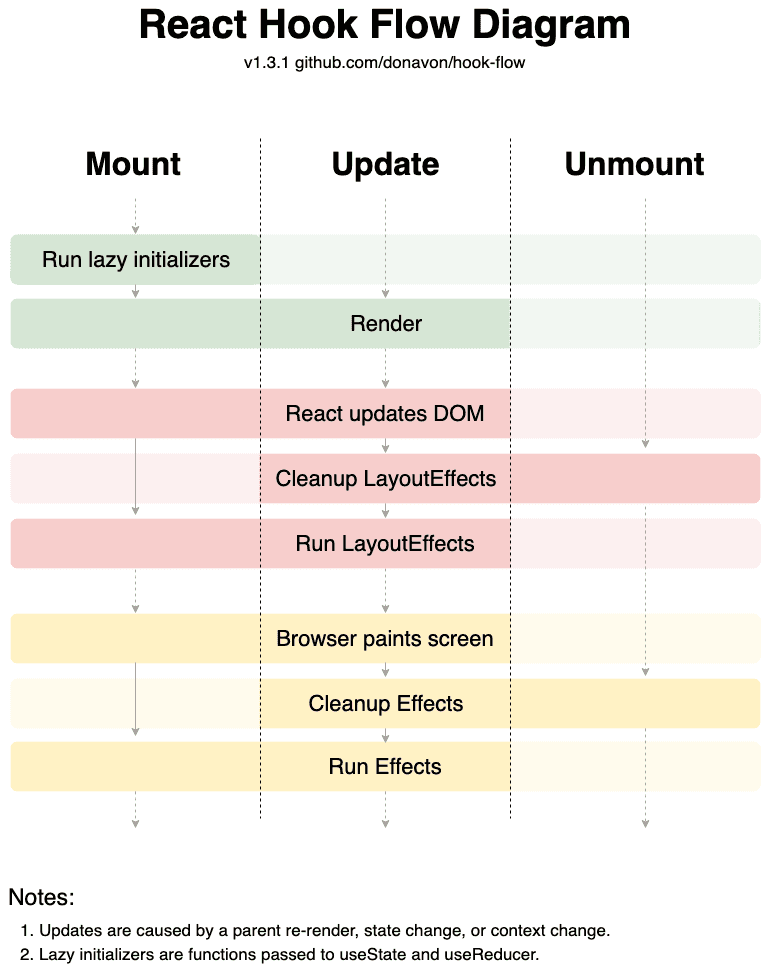
useLayoutEffect runs after React commits DOM changes but before the browser repaints the screen.
It lets you measure layout and synchronously update the UI before the user sees the result, helping prevent visual flicker.
1. Syntax
useLayoutEffect(() => {// Read or update layout synchronouslyreturn () => {// Clean up layout-related side effects}}, [dependencies])
The effect runs after the initial commit and after subsequent commits when its dependencies change. The cleanup runs before the effect reruns and when the component unmounts.
2. Measure DOM Before Paint
Suppose a tooltip needs to know its height before determining its final position.
import { useLayoutEffect, useRef, useState } from 'react'function Tooltip() {const ref = useRef<HTMLDivElement>(null)const [height, setHeight] = useState(0)useLayoutEffect(() => {const element = ref.currentif (!element) returnsetHeight(element.getBoundingClientRect().height)}, [])return (<divref={ref}style={{ transform: `translateY(-${height}px)` }}>Tooltip content</div>)}
React can measure the element and process the resulting state update before the browser paints, avoiding a visible intermediate position.
3. Synchronize Scroll Position
You can restore a scroll position before paint when that behavior is required.
useLayoutEffect(() => {window.scrollTo(0, savedPosition)}, [savedPosition])
Use this carefully: restoring scroll position can affect the user’s current interaction, and the correct timing depends on the application.
Share
