

Table Of Contents
Folder and file conventions
Top-Level Folders
Top-level folders help organize your application code and static assets.
| Folder | Purpose |
|---|---|
app | App Router (modern routing system) |
pages | Pages Router (legacy routing) |
public | Static assets (images, fonts, etc.) |
src | Optional folder for application source code |
The src folder is optional but recommended for separating application logic from configuration files.
Top-Level Files
These files configure and manage your project:
| File | Purpose |
|---|---|
next.config.js | Next.js configuration |
package.json | Dependencies and scripts |
instrumentation.ts | OpenTelemetry and instrumentation |
proxy.ts | Request proxy |
.env* | Environment variables (not tracked in Git) |
eslint.config.mjs | ESLint configuration |
tsconfig.json | TypeScript configuration |
jsconfig.json | JavaScript configuration |
next-env.d.ts | Type declarations (not tracked) |
.gitignore | Git ignore rules |
Routing File Conventions
Next.js uses file-based routing. Special files define behavior within each route segment.
| File | Purpose |
|---|---|
layout.tsx | Shared layout (header, nav, footer) |
page.tsx | Public route page |
loading.tsx | Loading UI (Suspense boundary) |
error.tsx | Error boundary |
global-error.tsx | Global error UI |
not-found.tsx | 404 page |
route.ts | API endpoint |
template.tsx | Re-rendered layout |
default.tsx | Parallel route fallback |
Metadata File Conventions
App Icons
| File | Purpose |
|---|---|
favicon.ico | Browser favicon |
icon.png | App icon |
apple-icon.png | Apple devices |
Open Graph & Social Images
| File | Purpose |
|---|---|
opengraph-image.png | Facebook/LinkedIn preview |
twitter-image.png | Twitter preview |
SEO Files
| File | Purpose |
|---|---|
sitemap.xml | Sitemap |
robots.txt | Robots instructions |
These can also be dynamically generated using .js or .ts.
Routes
Nested Routes
Folders define URL segments. Nested folders create nested routes.
Example:
app/├── layout.tsx├── page.tsx└── blog/├── layout.tsx├── page.tsx└── authors/└── page.tsx
Resulting URLs:
//blog/blog/authors
A route becomes publicly accessible only when a page.tsx or route.ts file exists.
Dynamic Routes
Dynamic routes use square brackets:
| Pattern | Example URL |
|---|---|
[slug] | /blog/my-first-post |
[...slug] | /shop/clothing/shirts |
[[...slug]] | Optional catch-all |
Example:
app/blog/[slug]/page.tsx
Access parameters via:
export default function Page({ params }) {return <div>{params.slug}</div>}
Route Groups
Wrap folder names in parentheses to organize routes without affecting the URL.
app/(marketing)/page.tsx → /
Useful for:
- Grouping marketing pages
- Sharing layouts
- Creating multiple root layouts
Private Folders
Prefix with underscore to exclude from routing:
app/blog/_components/Post.tsxapp/blog/_lib/data.ts
Useful for:
- UI utilities
- Helper functions
- Avoiding naming conflicts
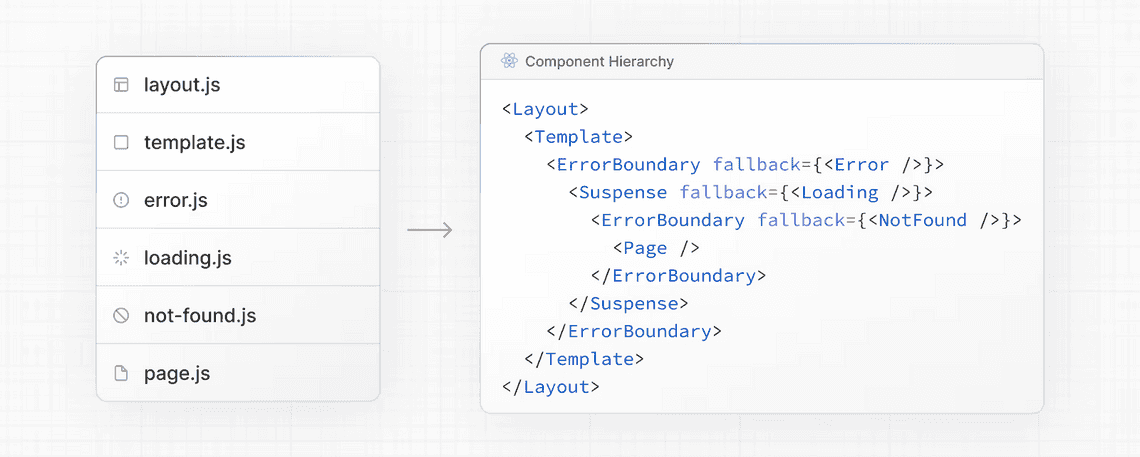
Component Hierarchy
Special files render in this order:
layouttemplateerrorloadingnot-foundpage (or nested layout)
Each nested route inherits and wraps with parent layouts recursively.
Project Organization Strategies
Next.js is flexible. Choose what fits your team.
We separate the app into 4 layers:
1️⃣ Interface Layer → Next.js routing (app/)2️⃣ Domain Layer → features/ (business logic)3️⃣ Shared Layer → reusable UI / hooks / utils4️⃣ Infrastructure → API, config, env, services
my-app/├── public/ # Static assets│├── src/│ ├── app/ # 🚨 ROUTING ONLY (Next.js layer)│ │ ├── (public)/ # Marketing pages│ │ │ ├── page.tsx│ │ │ └── layout.tsx│ │ ││ │ ├── (auth)/ # Auth experience│ │ │ ├── login/page.tsx│ │ │ └── layout.tsx│ │ ││ │ ├── (dashboard)/ # Protected app│ │ │ ├── products/page.tsx│ │ │ ├── orders/page.tsx│ │ │ └── layout.tsx│ │ ││ │ ├── api/ # BFF layer (thin controllers)│ │ │ └── products/route.ts│ │ ││ │ ├── layout.tsx # Root layout│ │ └── globals.css│ ││ ├── features/ # 🧠 DOMAIN-DRIVEN MODULES│ │ ├── auth/│ │ │ ├── api/│ │ │ ├── hooks/│ │ │ ├── components/│ │ │ ├── schemas/│ │ │ └── types.ts│ │ ││ │ ├── products/│ │ │ ├── api/│ │ │ │ ├── getProducts.ts│ │ │ │ └── createProduct.ts│ │ │ ││ │ │ ├── components/│ │ │ │ ├── ProductCard.tsx│ │ │ │ └── ProductTable.tsx│ │ │ ││ │ │ ├── hooks/│ │ │ │ └── useProducts.ts│ │ │ ││ │ │ ├── services/ # Business rules│ │ │ │ └── product.service.ts│ │ │ ││ │ │ ├── schemas/│ │ │ │ └── product.schema.ts│ │ │ ││ │ │ └── types.ts│ │ ││ │ └── orders/│ ││ ├── components/ # 🔁 Shared reusable UI│ │ ├── ui/│ │ │ ├── Button.tsx│ │ │ ├── Modal.tsx│ │ │ └── Input.tsx│ │ ││ │ ├── form/│ │ └── layout/│ ││ ├── hooks/ # Global hooks│ │ ├── useDebounce.ts│ │ ├── useMediaQuery.ts│ │ └── useAuth.ts│ ││ ├── lib/ # ⚙️ Infrastructure Layer│ │ ├── fetcher.ts # API client│ │ ├── env.ts # Typed env config│ │ ├── logger.ts│ │ ├── analytics.ts│ │ └── auth.ts│ ││ ├── providers/ # React providers│ │ ├── QueryProvider.tsx│ │ ├── ThemeProvider.tsx│ │ └── SessionProvider.tsx│ ││ ├── styles/│ │ └── tokens.css│ ││ ├── types/ # Global types│ │ └── global.d.ts│ ││ └── config/ # App-level configs│ ├── routes.ts│ └── navigation.ts│├── tests/ # E2E + integration tests│ ├── e2e/│ └── integration/│├── .env├── next.config.js├── tsconfig.json├── package.json└── README.md